Amazon FBA Black Friday deadline: why Delivered is not the same as ready
Amazon's US Black Friday FBA arrival dates are 21 and 28 October 2026. Why Delivered is not received, and how to plan Q4 inbound around Prime eligibility.

- 12 min read
- FBA & Operations
Fact-checked against Amazon's own pages on 9 Oct 2026
On this page
The short answer
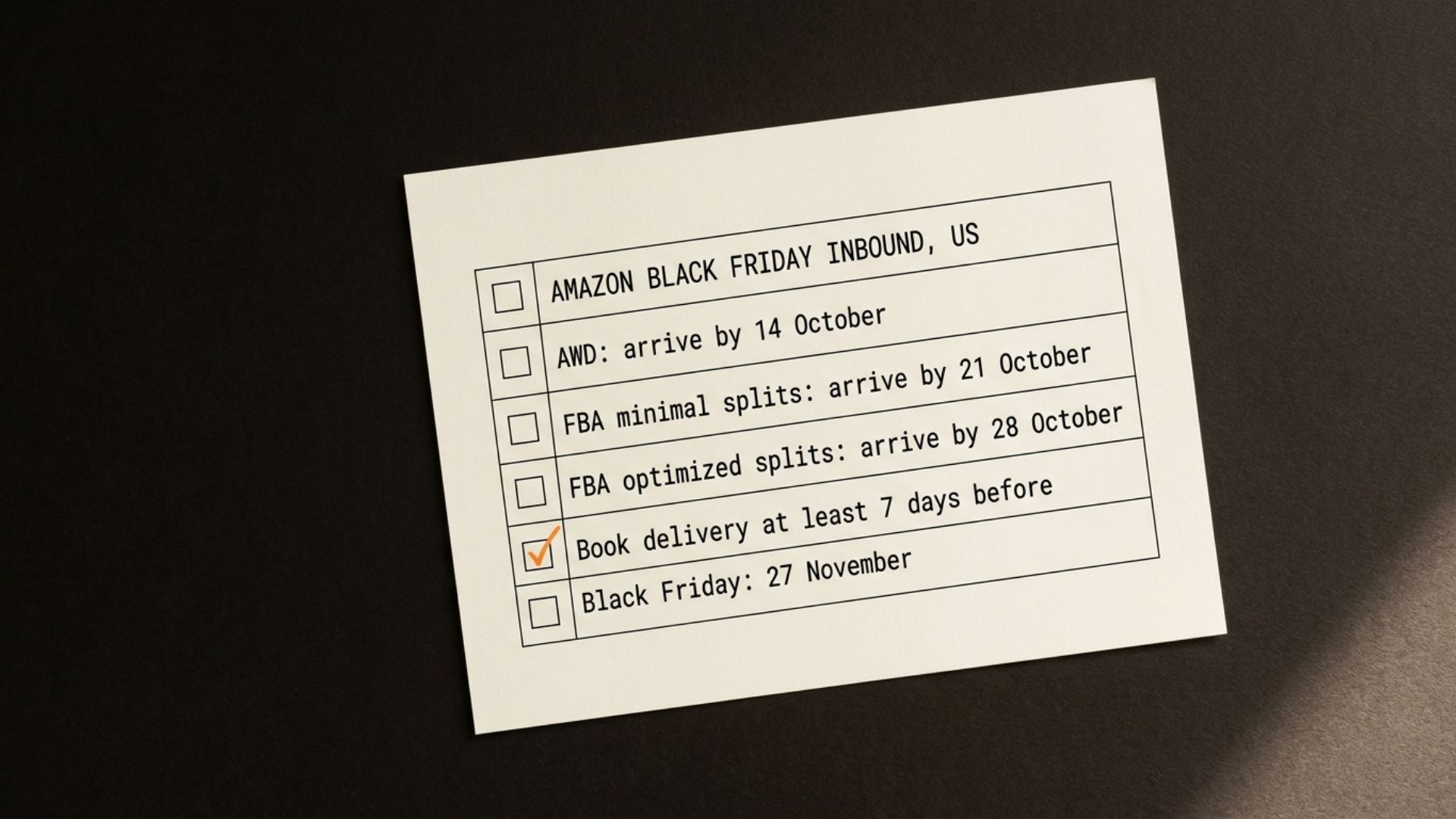
- The Amazon FBA Black Friday deadline (US): AWD by 14 October, FBA with minimal shipment splits by 21 October, FBA with Amazon-optimized splits by 28 October 2026, according to Amazon’s Holiday 2026 announcement.
- Amazon’s own buffer: its Q4 2026 peak readiness playbook recommends scheduling your delivery appointment at least 7 days before those dates.
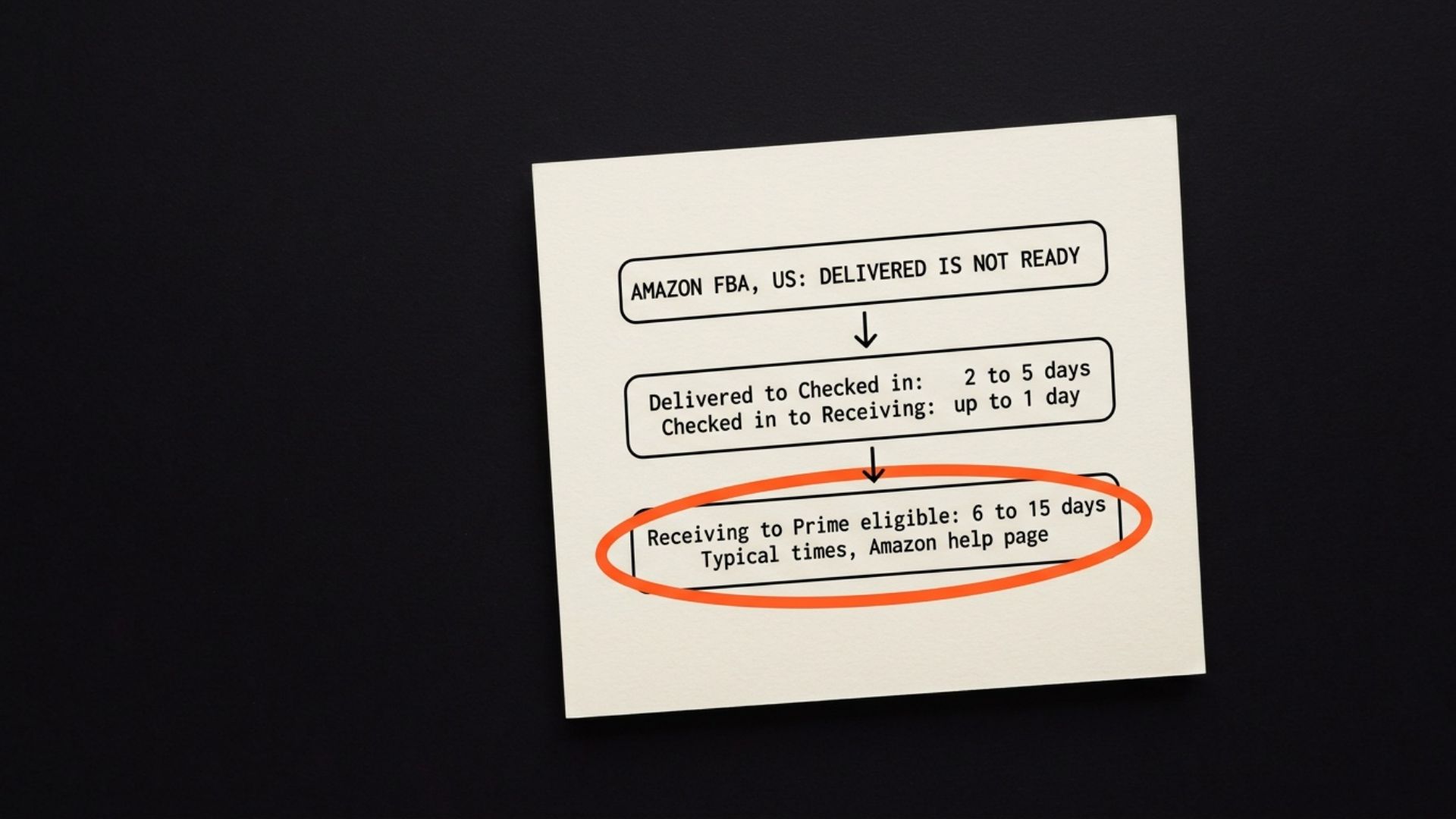
- Delivered is the start: Amazon’s help page gives typical times of 2 to 5 days from Delivered to Checked in, up to 1 more day to Receiving, then 6 to 15 days to Prime eligible.
- What Amazon has not said: which status counts as arriving for the deadline. Planning for units to be received, not just delivered, is the safer reading.
- Amazon will not expedite receiving: the help page says Amazon cannot manually expedite receiving, so the levers are what you ship, how it is labelled and tracked, and when.
- Reconciliation waits for Closed: a shipment only becomes eligible for reconciliation once its status is Closed, so a shortage you spot in November may have to wait until the shipment closes, which can be once it has been open more than 45 days since you created it.
There is one line in Amazon’s shipment tracking help page that every plan for the Amazon FBA Black Friday deadline should be built around. Once your units are received at the first Amazon facility, it says, they typically take between 6 and 15 days to become Prime eligible. That is after receiving, and receiving only starts after the shipment has been delivered and checked in.
Now put that next to the arrival dates. Amazon’s Holiday 2026 announcement asks for FBA inventory to arrive by 21 October with minimal shipment splits, or 28 October with Amazon-optimized splits, and the sentence that introduces them gives the reason: “To ensure Prime-badge eligibility for your products during this year’s events, make sure your inventory arrives at our facilities by the following dates:” The deadline is about the Prime badge. The badge comes at the end of the receiving process, not at the moment your tracking says Delivered.
So a shipment marked Delivered on 27 October is not the same thing as stock that is ready for Black Friday on 27 November. Here is how the stages work, what Amazon has and has not said, and how to plan the weeks before the deadlines around Received rather than Delivered.
Why a Delivered shipment is not ready to sell
Amazon’s Track your shipments help page defines each status quite literally.
- Delivered: the carrier has told Amazon the shipment reached the fulfillment center yard, but the fulfillment center has not checked it in yet. Your boxes may still be sitting on a trailer.
- Checked in: the trailer has moved from the yard to the dock door and is ready to be unloaded. Nothing has been through receiving.
- Receiving: Amazon has started scanning your shipment ID labels. In Amazon’s words, “Units are available for sale as soon as they’re received.”
- Prime eligible: received units may then be moved to other fulfillment centers closer to customers, and the page says they become Prime eligible once they are stored at the final one.
That last step is the one that catches people out. A unit can be received and for sale, but not yet carrying the Prime badge, because it is still being transferred. The help page is plain about this in its FAQ: received units may not be Prime eligible until they are transferred and stowed at the final fulfillment centers.
| Step | Typical time (US) |
|---|---|
| Delivered to Checked in | 2 to 5 days |
| Checked in to Receiving | Up to 1 day |
| Receiving to Prime eligible | 6 to 15 days |
Add those up and a shipment can typically take somewhere around 8 to 21 days from Delivered to Prime eligible. That is our arithmetic on Amazon’s typical ranges, not a figure Amazon publishes, and Amazon says actual times vary. The page adds that processing can take longer during seasonal peaks, and gives an additional 5 to 10 days after events like Black Friday and Prime Day as one example.
Amazon also says it in so many words: “Amazon cannot manually expedite the receiving progress for any shipment.” On that basis, a case is not going to speed it up either. What you ship, how it is labelled and tracked, and when it arrives are the parts you control.
The Amazon FBA Black Friday deadline for 2026
Amazon’s Holiday 2026 announcement on the US Seller Forums and Amazon’s Q4 2026 peak readiness playbook give the same three dates for Black Friday Week and Cyber Monday on Amazon.com:
- 14 October: Amazon Warehousing and Distribution (AWD) shipments.
- 21 October: FBA shipments with minimal shipment splits selected.
- 28 October: FBA shipments with Amazon-optimized shipment splits selected. The announcement notes that most sellers select this option.
These are arrival dates, not ship dates. The playbook goes one step further: “To allow time for transportation to our fulfillment centers, we recommend that you schedule your delivery appointment at least 7 days before the dates listed above.” One way to read that is to have delivery appointments booked by about 14 October for minimal splits and about 21 October for Amazon-optimized splits. If you use the Amazon Partnered Carrier program, the playbook asks you to schedule your carrier pickup 14 days before the dates instead. Black Friday itself is 27 November, but Amazon runs the event as Black Friday Week, so it is safer to plan for stock to be ready before the Friday itself.
Capacity tightens at the same time. The announcement says fulfillment center teams focus on receiving in September and October, then shift to customer orders in November and December. The playbook adds that inbound delivery window slots will be limited, and that you may see lower estimated capacity limits for October and November.
These are US dates for Amazon.com. The deal side of Black Friday, including the 20 October deal submission cutoff, is in our Black Friday deal deadline guide.
What Amazon has not said about arrival
The announcement asks for inventory to arrive at Amazon’s facilities by each date. Neither the announcement nor the playbook says whether that means Delivered, Checked in or Received. We could not find an Amazon page that settles it.
Our reading, and it is a reading rather than Amazon’s rule: the dates exist to protect the Prime badge, and Amazon’s own help page says the badge comes after receiving and any transfer. If a shipment only shows Delivered on the deadline day, it has the whole receiving process still ahead of it. Planning as if the date means Received costs you a few days of lead time. Planning as if it means Delivered can cost you the badge during the event.
The playbook points the same way. It asks sellers to allow enough lead time between inventory shipments and deal start dates for promotional inventory to be fully processed and available when customers are shopping. Fully processed is not a status any carrier can give you.
How to know if your Q4 shipment is at risk
The Shipment events tab, on the shipment summary page for each shipment, is where Amazon puts its estimates. According to the help page, an estimated check-in time is published once the shipment enters Delivered, and an estimate for Prime eligibility is published once it enters Receiving. Those two estimates tell you far more than the status alone.
- No Delivered status at all: Amazon says a delivered shipment may not show Delivered if the tracking ID is missing or the carrier and fulfillment center signals do not sync, and then it cannot give you an estimated check-in time. Missing tracking is worth fixing first.
- “Longer processing”: this label means the facility is slower than usual. Amazon says the shipment should still process within the published estimate.
- Directed to prep: inventory that is not packaged, prepped or labelled correctly may be sent to a prep station, which delays Receiving, according to Amazon’s Troubleshoot receiving issues page.
- Units received against another shipment: when several shipments arrive at the same fulfillment center together, Amazon says items may be counted against the wrong shipment ID. They are received, but look missing from yours. The Inventory Ledger report shows which FNSKU went with which shipment.
For delays during weather or seasonal peaks, when a shipment shows Longer processing, Amazon’s help page says to contact Selling Partner Support if the shipment is more than 5 business days past its updated estimated timeline, or if its status has not updated for more than 10 days after delivery.
What to check first, before 21 and 28 October
The order matters here, because the first two items decide which deadline you are really working to.
- Which split option you are on: minimal splits send inventory, generally to a single location, for a fee. Amazon-optimized splits send it to multiple locations for no fee, but to qualify each item needs at least five identical cartons or pallets, per Amazon’s FBA inbound placement service fee page. Minimal splits get the earlier date. Optimized splits get an extra week, and more destinations to ship to. Amazon also says which options you see depends on your product types, quantities and its capacity, and Bulky items have a third, partial splits option that the announcement gives no Black Friday date for.
- Whether your delivery window is real: the playbook says shipments arriving within their scheduled window get priority processing, while those outside it may face appointment and receive delays. A window entered weeks ago and never updated is worth correcting now.
- Tracking and carrier details: Amazon says accurate tracking helps it plan and receive faster. Without a tracking ID, the help page says, it cannot update the shipment to Delivered at all.
- Box content information: the playbook says leaving it out can disqualify a shipment from auto-receiving and add an FBA manual processing fee. Slower and more expensive, in the weeks Amazon says capacity is limited.
The one that surprises people is the first. Choosing Amazon-optimized splits to save the placement fee is a perfectly good decision in June. In October it also means your stock lands in several places at once, during the weeks Amazon itself says capacity is limited.
How a late or stuck shipment gets handled
There is no button that makes a shipment arrive faster, so the work is about protecting the listing and the money while receiving finishes.
Read the estimates, not the status. Once a shipment is Receiving, the Shipment events tab shows Amazon’s estimate for Prime eligibility. If that estimate lands after your deal starts, you know now rather than on the day. That is the moment to decide how much of the deal plan rests on that stock.
Watch the hero ASINs separately. If one ASIN carries your Black Friday deal, it is worth tracking its units shipment by shipment. A few cartons stuck at one site can matter more than the whole shipment’s average, and running out during an event has a cost after the event too, which our guide to recovering rank after a stockout explains.
Use support at Amazon’s thresholds. For a delayed shipment, that means more than 5 business days past the updated estimate, or no status update for more than 10 days after delivery, which is where Amazon’s help page says to contact support.
Reconcile once it is Closed, and only then. Amazon’s Reconcile your shipment page says a shipment can only be eligible for reconciliation when its status is Closed. Amazon closes a shipment once all units are confirmed received, or once it has been open for more than 45 days for a domestic shipment, counted from when the shipment was created. Research needs proof of inventory ownership and proof of delivery, so it is worth having the invoices ready. Our FBA shipment reconciliation guide covers how those cases are built and the windows that apply.
How to stop the Q4 inbound scramble next year
- Plan to Received, not Delivered: build the inbound calendar backwards from the date the stock needs to carry the Prime badge, and add Amazon’s typical receiving ranges on top of transit time.
- Take Amazon’s seven days seriously: the playbook recommends scheduling delivery appointments at least 7 days before each deadline, to allow time for transportation. Building that into the calendar from the start is easier than finding it in October.
- Look at AWD for the overflow: for this year, Amazon’s announcement says that if you send inventory through AWD and enable automatic replenishment to FBA, you keep paying the off-peak monthly storage rate through 31 October 2026. AWD has the earliest Black Friday deadline, 14 October, so it suits stock that is ready now, and it is worth checking Amazon’s terms again for next year.
Get your Black Friday inbound plan checked before 21 October
I understand how stressful this part of the year is. The deal is booked, the ads are planned, and everything rests on cartons you cannot see. The work that helps is unglamorous: reading every open shipment’s Shipment events tab, knowing which ASINs depend on which cartons, and fixing tracking and box content gaps while there is still time.
That is what our inventory management team does for brands through Q4. We cannot make Amazon receive faster. What we can do is go through your open shipments and your Black Friday ASINs with you and tell you, plainly, where the risk is. Get in touch and we will look at it together.
Common questions about the Amazon FBA Black Friday deadline
What is the Amazon FBA Black Friday deadline in 2026
For Amazon.com, Amazon's Holiday 2026 announcement asks for AWD shipments to arrive by 14 October, FBA shipments with minimal shipment splits by 21 October, and FBA shipments with Amazon-optimized splits by 28 October 2026. Amazon ties these dates to Prime-badge eligibility during Black Friday Week and Cyber Monday. Its Q4 playbook also recommends scheduling your delivery appointment at least 7 days before each date.
Why does my FBA shipment say Delivered but not received
On Amazon's help page, Delivered means the carrier reported the shipment at the fulfillment center yard, but the fulfillment center has not checked it in yet. Amazon gives a typical 2 to 5 days from Delivered to Checked in, and up to 1 more day to Receiving, with longer times possible in seasonal peaks. The Shipment events tab shows Amazon's estimated check-in time once the shipment is Delivered.
How long after receiving do FBA units become Prime eligible
Amazon's help page says units are available for sale as soon as they are received, but it typically takes between 6 and 15 days for them to become Prime eligible, because they may be transferred to fulfillment centers closer to customers. Amazon says actual times vary with the number and length of those transfers.
Can Amazon expedite a stuck FBA shipment before Black Friday
No. Amazon's help page says it cannot manually expedite the receiving progress for any shipment. For delays during weather or seasonal peaks, it suggests contacting Selling Partner Support if a shipment is more than 5 business days past its updated estimated timeline, or its status has not updated for more than 10 days after delivery.
Should I choose minimal splits or Amazon-optimized splits for Q4
Amazon-optimized splits have no placement fee and the later 28 October arrival date, but need at least five identical cartons or pallets per item and send stock to several locations. Minimal splits send inventory, generally to a single location, for a fee, and must arrive a week earlier, by 21 October. The real question is whether you can pack and ship to several sites in time. Amazon says which options you are offered depends on your product types, quantities and its capacity.
When can I reconcile missing units from a late Q4 shipment
Amazon says a shipment can only be eligible for reconciliation once its status is Closed. A domestic shipment closes when all units are confirmed received, or once it has been open for more than 45 days since it was created. Research needs proof of inventory ownership and proof of delivery.
Sources
- Track your shipments: Shipping Queue and Shipment summary, Seller Central help (US)sellercentral.amazon.com
- Holiday 2026: Same fees, same eligibility, earlier deadlines, Amazon announcement, US Seller Forumssellercentral.amazon.com
- Q4 2026 peak readiness playbook, Seller Central help (US)sellercentral.amazon.com
- Troubleshoot receiving issues, Seller Central help (US)sellercentral.amazon.com
- FBA inbound placement service fee, Seller Central help (US)sellercentral.amazon.com
- Reconcile your shipment, Seller Central help (US)sellercentral.amazon.com
Founder, AVA INC.
Shilpi Dudani is the founder of AVA INC. Her team manages Seller Central accounts, fixes catalog problems and optimizes listings for Amazon sellers.
Not sure whether this is your problem?
We will look at your account and tell you what is actually wrong before you spend anything.
Get your free, no-obligation audit