Amazon returnless refunds before the holiday returns: what FBA sellers give up
Amazon FBA returnless refunds save return fees, but the kept units earn no reimbursement and still count in your return rate. How to decide per ASIN.

- 12 min read
- FBA & Operations
Fact-checked against Amazon's own pages on 19 Oct 2026
On this page
The short answer
- What it is: with FBA Returnless Resolutions, the buyer gets a refund and keeps the item, so nothing travels back to a fulfillment center.
- What you save: Amazon says you avoid fees tied to high return rates, customer returns processing, storage and removals, and there is no program fee.
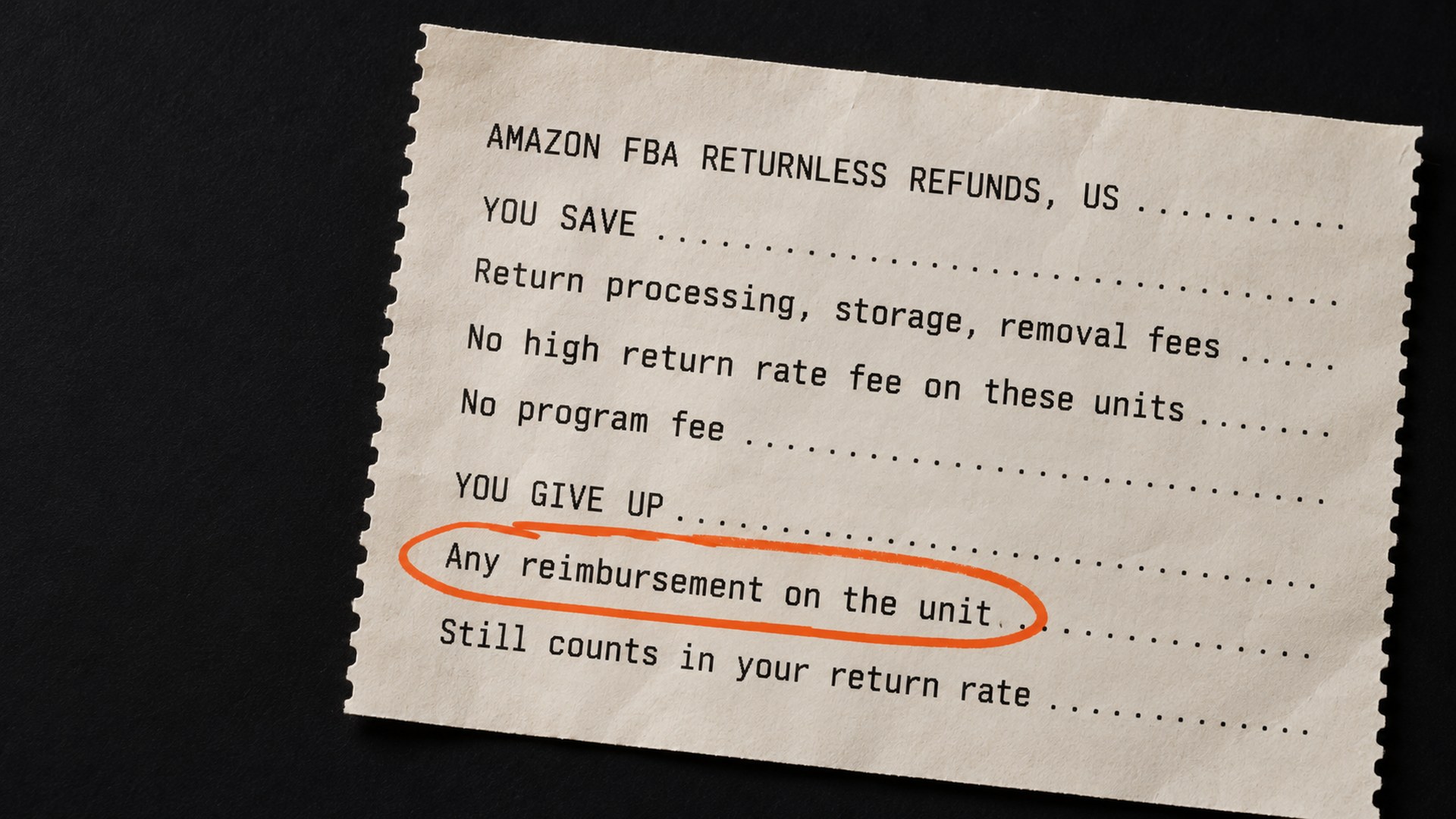
- What you give up: Amazon's help page is plain that you "do not receive any reimbursement" when a customer keeps an item, and its FAQ extends that to any return where the returnless option is offered.
- What does not change: each returnless return still counts toward the ASIN's average return rate and its high return rate threshold, although the high return rate fee is not charged on it.
- The decision: enroll the ASINs where getting the unit back costs more than it is worth, and keep the rest on normal returns, where you may still be reimbursed for a unit damaged in Amazon's care.
In early October 2026 an Amazon moderator updated a Seller Forums guide called "Returnless Refunds: When to Use Them and How to Set Thresholds". It explains when to let a buyer keep the item and still get their money back. One of the most liked replies underneath it opens: "When to use them: Never."
I understand why sellers feel that way. But an Amazon returnless refund is not a yes or no question for your whole catalog. It is a decision per ASIN, and the holiday returns window is the reason to make it now rather than in January.
Amazon's FBA customer returns policy says "Customers can return eligible items shipped during November and December until the end of January." Only returns created after you switch the setting on are eligible, and holiday returns can be opened until the end of January, so what you set in the next few weeks will apply to many of them. Amazon still checks each return individually.
This guide covers what the program saves you, what it costs you that the announcements do not lead with, and how to decide which ASINs belong in it. Everything below is for Amazon.com (US) FBA, as Amazon's help page described it on 19 October 2026.
What an Amazon returnless refund is, and who can use it
By default, an FBA buyer sends the item back to Amazon's fulfillment center, where it is checked and either returned to your sellable stock or marked unsellable. When you enroll in FBA Returnless Resolutions, Seller Central help (US), the buyer is refunded and keeps the product instead.
Amazon opened price-based enrollment in the US in November 2025, in a News_Amazon post on enrolling by price. In July 2026 a second News_Amazon post on reducing return costs described it as a free program for Professional plan sellers who use FBA, and said you can set your rules by price range, product category or return reason. The US help page lists only price and ASIN-based settings, so check what your own settings page offers.
Not everything qualifies. The help page sets out who and what can take part:
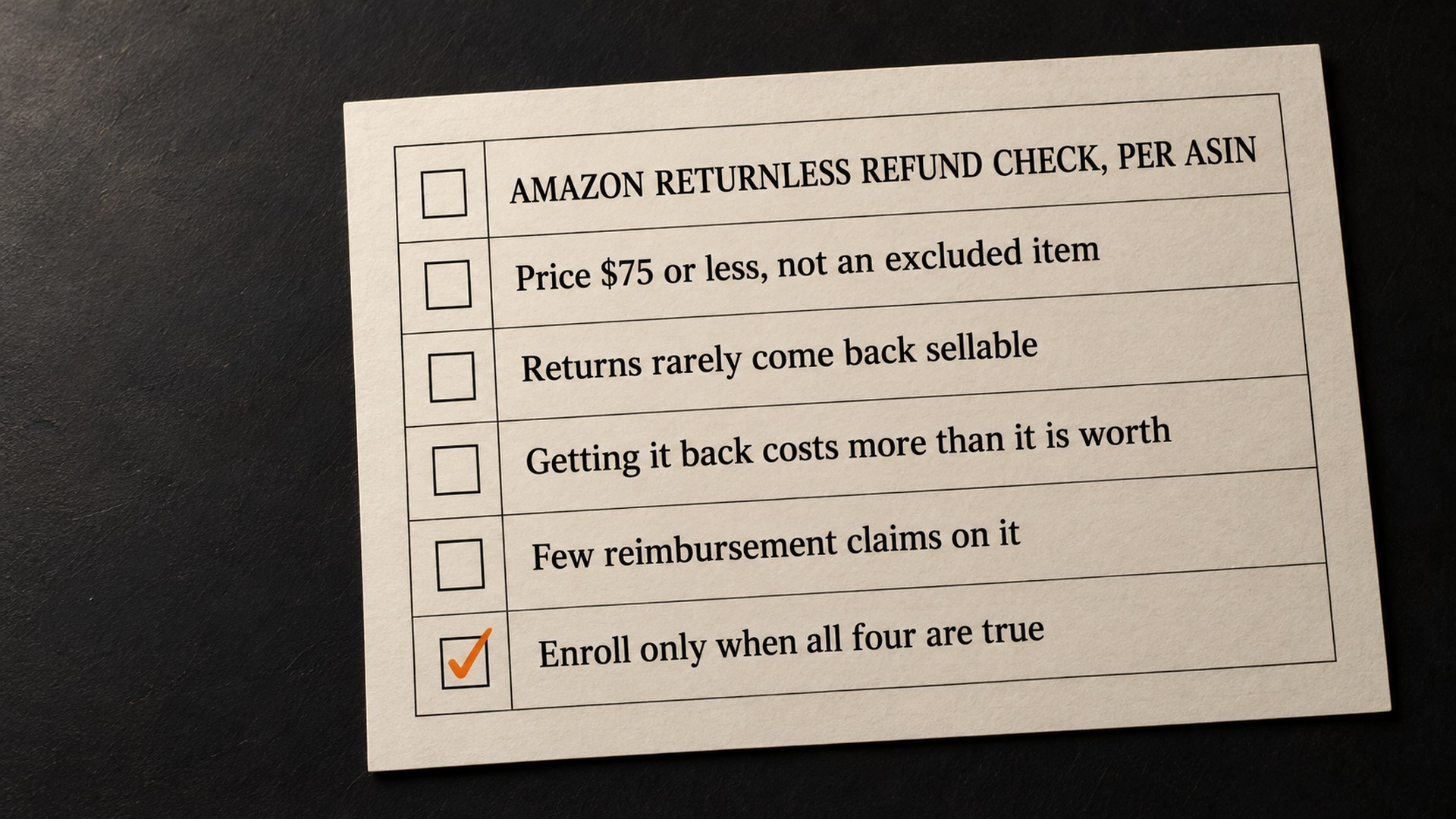
- Price: the item's average selling price must be $75 or less.
- Product: dangerous goods, recalled products, gift cards, heavy and bulky items and non-returnable items are excluded.
- Buyer: the customer must have no history of program abuse.
- Seller: you must be in good standing, as Amazon defines it.
Enrolling does not make every return returnless, because Amazon checks each return against these criteria, and a return that fails goes back to the fulfillment center as normal. And, in the help page's words, "Customers are not made aware of which items are offered a Returnless Resolution." The option appears only during the return process.
Why the reimbursement matters more than the fee
Amazon's announcements lead with savings. The help page has a section called "Before you enroll - Key trade-offs", and the first trade-off is the money you stop recovering.
On a normal FBA return, Amazon evaluates the unit when it arrives. If it is unsellable, Amazon works out who caused the damage and decides whether you are eligible for a reimbursement, based on the item's physical condition rather than the reason the buyer picked. The FBA inventory reimbursement policy covers customer return claims, and values them on the refund given to the customer minus applicable fees.
Under a returnless resolution, none of that happens. The help page says you "do not receive any reimbursement", and Kris_Amazon's guide repeats it: "No reimbursement on returnless resolutions." As I read it, nobody inspects the unit, so there is nothing to claim against.
That matters most on ASINs where returns come back in a state Amazon is responsible for, or where a unit goes missing on its way back. On a $6 consumable that could never be resold once opened, less is at stake, but it is not zero. Amazon's customer return claims page says that if a customer returns an item damaged through no fault of Amazon or the seller, Amazon may charge them a damage fee, and where it does, you may be eligible for a credit, and that if a refunded customer does not send the item back within 60 days, "Amazon will in most cases charge the customer and reimburse you." As I read it, neither can happen when no return is expected.
What happens to your return rate
Amazon's announcement says the program saves "the fees associated with high return rates", which is easy to read as the returns no longer counting. They still count.
The help page answers it directly. A returnless resolution "will still count toward the ASIN's average return rate and high return rate threshold." What changes is the fee: "The high return rate fee is not charged for returns that are successfully given to customers through FBA Returnless Resolutions."
So the program removes a charge on those units but leaves the rate itself untouched. If an ASIN is near its high return rate threshold, enrolling it does nothing to bring the rate down.
One wrinkle. Amazon's 2026 returns processing fee page defines a product's return rate by the units "physically returned", which does not sit neatly with the returnless help page. The returnless page is the one written for this program, so it is the one I would go by, but the two pages do not fully agree.
Amazon does not say whether the rate rises once buyers no longer have to post anything back. On a Seller Forums thread on return rates under returnless resolutions, a large seller estimated that roughly 20% of the return requests they see are abandoned, and expected that to fall to zero once the buyer keeps the item. Another seller replied that they saw no statistically meaningful increase in their overall return rate. Those are two sellers' accounts, not Amazon data, and I would treat the question as open until your own numbers settle it.
How to know which ASINs belong in it
Amazon's own test is short: returnless resolutions "are most cost-effective when return shipping and processing costs exceed the item's value." Its July post gives the example of paying $8 to $12 to ship back a $5 item. That is the easy case, and it is real.
The harder cases sit in the middle, and four things decide them, ASIN by ASIN:
- What comes back: if most returned units for this ASIN end up unsellable, getting them back buys you nothing but a removal or disposal decision.
- What the return costs: Amazon charges a returns processing fee on returned Apparel and Shoes items, and on other products for each returned unit above the product's return rate threshold (products that shipped fewer than 25 units in a month are exempt), and every category carries the cost of storing or removing what comes back.
- What you recover today: if your reimbursement history shows real money on this ASIN's returns, enrolling it ends those claims.
- Where the return rate sits: enrolling removes the high return rate fee on those units but not the rate itself, so an ASIN close to its threshold stays close.
Kris_Amazon's guide suggests low-cost items, items that cannot be resold once opened such as hygiene products and perishables, lightweight goods where storage and removal add up, and products with high return rates. It also suggests you "Start with your lowest-ASP products" and "Review your FBA Returns report". I would add one step before either: read your reimbursement history for the same ASINs, because that is the money the program switches off.
If you have not looked at what Amazon owes you on returns recently, our guide to FBA shipment reconciliation and the money Amazon owes you covers where those amounts show up.
Price threshold or ASIN list?
The help page offers four settings: enable by price, with a maximum item price between $1.00 and $75.00; enable for all ASINs, with an optional CSV of exclusions; enable for selected ASINs, with a CSV of up to 10,000 ASINs; or disable for all ASINs.
Amazon's moderator calls enrolling by price "Recommended for most sellers". I lean the other way for any catalog with more than a handful of products, because a price threshold treats a $12 bottle of shampoo and a $12 phone case the same, when one usually cannot be resold once opened and the other often comes back fine. A list of selected ASINs lets you enroll the first and keep the second on normal returns.
The setting lives under the settings menu, then Fulfillment by Amazon, then FBA customer returns settings (Amazon's forum posts call this section FBA returns evaluation & ownership settings), where you click Edit next to Returnless Resolutions. Changes take effect immediately, and only customer returns created after you switch it on are eligible. Amazon asks you to allow up to 24 hours before contacting Selling Partner Support about it.
Turning it off is the same path. An Amazon moderator answering a seller who could not find the opt-out pointed to the option "Disable returnless resolutions for all ASINs".
Is returnless refund fraud a reason to stay out?
Many of the forum replies are about fraud. One seller replying on Kris_Amazon's thread offered returnless refunds on items under $15, then had one buyer get refunds on three orders, and opted out. That is a real cost, and I would not tell anyone it cannot happen to them.
On Amazon's side, the help page says returnless requests are "constantly monitored for signs of fraud" and are "not unconditionally approved", and a moderator on the July post said the guardrails are the same ones Amazon has used for years on its own products. Buyers with a history of abuse are not offered the option.
My reading is that fraud is a strong reason to choose ASINs carefully, and a weak reason to refuse the program on every product. The products where returnless makes sense are, by definition, ones where the unit you would have got back was worth little to you. The products a fraudster wants are the ones you should never have enrolled.
How to keep it from going wrong over the holidays
Amazon's help page says "There are currently no downloadable reports for FBA Returnless Resolutions." So the place to see what the program did is the FBA Returns page, where the return status reads "Return not expected" once a returnless resolution has been offered, and "Customer granted returnless resolution" after the return window passes and the buyer has accepted it.
That makes a regular look at that page the whole of your monitoring. Through January, I would check the enrolled ASINs weekly and look for the same buyers or the same ASINs turning up again and again. If an ASIN's pattern changes, take it off the list. Amazon says changes take effect immediately, but a seller replying to Amazon's July post reported returnless refunds continuing after deleting every rule, on products that cost over $500, which Amazon's $75 cap should exclude, so keep checking the FBA Returns page afterwards.
Two things keep the rest of your returns healthy while you do this:
- Keep claiming on the ASINs you did not enroll: those returns still go through Amazon's evaluation, and a unit damaged in Amazon's care may still be reimbursed under the reimbursement policy.
- Handle removals on time: Amazon's returns policy requires a removal order within 30 days for returned units marked defective or customer damaged, unless you have set automatic removal or disposal.
If your holiday stock is still on its way in, our guide to the FBA Black Friday arrival deadline covers the other date that matters this month, and the 2026 FBA fee changes set the fees you are weighing against.
Get your returns and reimbursements checked before the holiday window
The returnless decision is a reimbursement decision, and it is easy to make without looking at what you recover today. Our Amazon reimbursement service starts there: we read your return and reimbursement history per ASIN, find what is still claimable, and show you which ASINs cost more to bring back than they are worth.
I cannot tell you in advance what that will be worth on your account, and I will not promise a number. But we can show you where the money goes before the November and December sales start coming back. You can book a free audit and we will start from your own returns data.
Common questions about Amazon returnless refunds
Do I get reimbursed when a customer keeps the item under a returnless refund?
No. Amazon's FBA Returnless Resolutions help page says that when a customer keeps an item under the program, you do not receive any reimbursement, and its FAQ says any return where the returnless option is offered does not qualify. On a normal FBA return, Amazon evaluates the unit and you may be reimbursed if it was damaged while Amazon was responsible for it.
Do returnless refunds count toward my return rate?
Yes. Amazon says a returnless resolution still counts toward the ASIN's average return rate and its high return rate threshold. The high return rate fee is not charged on returns given to customers through the program, but the rate itself is not reduced.
Does it cost anything to enroll in FBA Returnless Resolutions?
Amazon says there are no program fees. You keep receiving the refund of your referral fee, less the refund administration fee, as with any other return. The cost is the reimbursement you can no longer claim on units customers keep.
Can customers see which products offer a returnless refund?
Amazon's help page says customers are not made aware of which items are offered a returnless resolution. If every eligibility check is met, the option is offered during the return process.
Which products are not eligible for returnless refunds on Amazon?
On Amazon.com, items with an average selling price above $75 are not eligible, and neither are dangerous goods, recalled products, gift cards, heavy and bulky items or non-returnable items. Each return is also checked against the customer's history and your account standing, so enrolling does not make every return returnless.
How do I turn off returnless refunds?
In Seller Central, go to the settings menu, then Fulfillment by Amazon, and click Edit next to Returnless Resolutions in the FBA customer returns settings. Choose to disable it for all ASINs, or upload a new ASIN list, and select Update. Amazon says changes take effect immediately.
Sources
- Returnless Refunds: When to Use Them and How to Set Thresholds, Kris_Amazon, Seller Forumssellercentral.amazon.com
- FBA customer returns policy, Seller Central help (US)sellercentral.amazon.com
- FBA Returnless Resolutions, Seller Central help (US)sellercentral.amazon.com
- Enroll in FBA Returnless Resolutions by price in the US, News_Amazon, Seller Forumssellercentral.amazon.com
- Reduce return costs with returnless resolutions, News_Amazon, Seller Forumssellercentral.amazon.com
- FBA inventory reimbursement policy, Seller Central help (US)sellercentral.amazon.com
- Customer return claims, Seller Central help (US)sellercentral.amazon.com
- 2026 returns processing fee changes, Seller Central help (US)sellercentral.amazon.com
- Return Rate Increase With Returnless Resolutions, Seller Forums threadsellercentral.amazon.com
- Ending Returnless Resolutions, Seller Forums threadsellercentral.amazon.com
- Refund administration fee, Seller Central help (US)sellercentral.amazon.com
Founder, AVA INC.
Shilpi Dudani is the founder of AVA INC. Her team manages Seller Central accounts, fixes catalog problems and optimizes listings for Amazon sellers.
Not sure whether this is your problem?
We will look at your account and tell you what is actually wrong before you spend anything.
Get your free, no-obligation audit