EU guarantee notice on Shopify: what the 27 September 2026 rule needs
The EU guarantee notice has applied since 27 September 2026. See whether your Shopify store needs it, where it goes and when the GARAN label applies.

- 11 min read
- Marketplace Expansion
On this page
The short answer
- What it is: a fixed EU graphic that a Shopify store shows to remind EU shoppers of their legal guarantee rights before they commit to a purchase.
- Since when: the regulation that fixes its design applies from 27 September 2026.
- What you cannot do: edit it. The regulation says none of its elements can be edited, which in my reading rules out your own wording and your own colours.
- Where it goes: the Commission gives flexibility. A sentence such as "Your legal guarantee rights" that opens the full notice is one example the Commission gives.
- The GARAN label: a second, separate graphic that applies only when a producer gives a free guarantee of more than two years on the whole product.
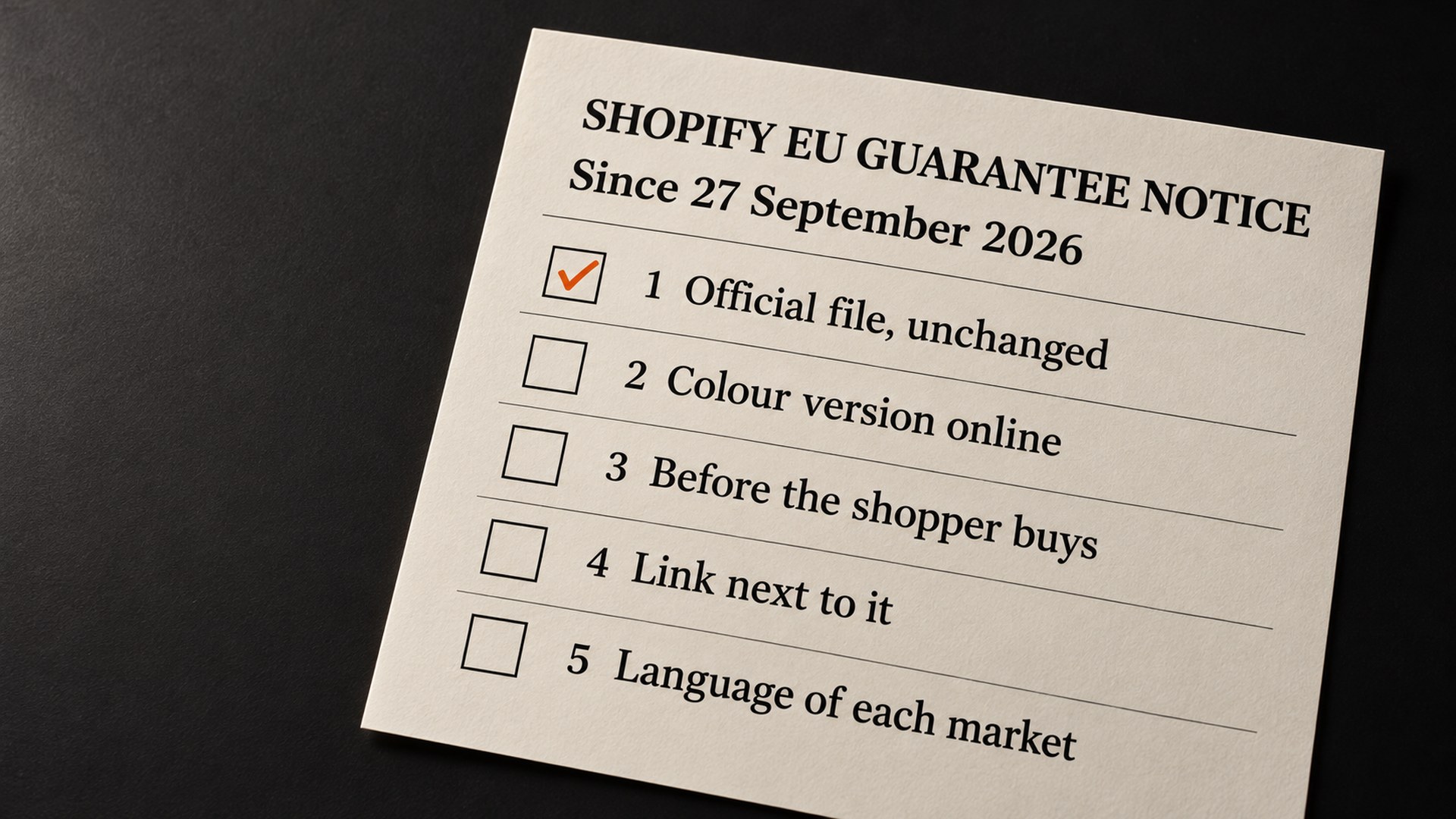
- Next step: open one product page on your phone and check the five items in the checklist above.
The Official Journal published the rule on 2 October 2025, and it started to apply on 27 September 2026. If your Shopify store sells goods to shoppers in the EU, there is an EU guarantee notice Shopify merchants selling into the EU are asked to show before the shopper buys, and a rule like this arrives without an email from anyone.
This guide covers what the notice is, whether your store needs it, where it goes, and when the second item, the GARAN label, comes into it. It is about your own Shopify store. What Amazon shows on its own listing pages is a separate matter that I do not cover here.
What is the EU guarantee notice, and why is it on your Shopify store?
The EU gives every consumer a legal guarantee on goods that do not match what was sold. The harmonised notice is the reminder of that guarantee. The regulation puts its purpose plainly: "The harmonised notice is a mandatory notice at the point of sale, intended to raise consumer awareness of their legal guarantee rights." (Commission Implementing Regulation (EU) 2025/1960, recital 2)
The reminder has to be given before the shopper is bound by a contract or any corresponding offer. Its content covers the main elements of the guarantee, including the minimum duration of two years and a general reference to the fact that national law may make it longer. The Commission designed one graphic to do all of that, and every seller uses the same one.
That changes who does the work. You are not asked to explain the guarantee in your own words. You are asked to show the Commission's version, whole. It applies from 27 September 2026, which is Article 3 of the regulation.
Does your Shopify store need the EU guarantee notice?
Neither the regulation nor the Commission's practical guidelines mention a size exemption for sellers, so a small store is not outside the rule on size alone. I read the rest of the test as who you sell to rather than where your company sits, and that is my reasoning, not a quotation.
In practice that gives these cases. A store that sells goods to consumers in the EU is in. A store that sells only to businesses is not selling to consumers, so it sits outside. A store that sells only to UK shoppers is outside an EU rule. A US or UK store that ships to shoppers in Germany or France is selling to EU consumers, so I would treat it as in scope. Edge cases, such as a store that mixes business and consumer sales, are a lawyer's call, and I am not one.
A quick self-check:
- Markets: any EU country enabled for selling in your Shopify markets settings, or any EU address that can reach checkout (a practical test, not a legal one).
- Buyers: consumers, not only businesses.
- Goods: physical products. This guide does not cover digital items.
What to check first on your product page
Open one product page on your phone, in a private window, with an EU address chosen if your store lets you. Then check these in order, cheapest first.
- Official file: The Commission publishes the file. A sentence you wrote yourself, even a good one, is not the notice.
- Colour: For online sales the regulation calls for the colour (RGB) version, and the guidelines say it must always be legible at default display size, so zoom out on a desktop and look again.
- Before the shopper buys: A notice that exists only in your terms and conditions fails this test, because the rule asks for it to be prominent, and a legal page nobody opens is not prominent. That is my reading of "prominent", not the Commission's wording.
- Link: The graphic has a QR code, and a shopper on a phone cannot scan the screen they are holding. The guidelines say a clickable link to the same destination as the QR code should always be available.
- Language: The shopper should see the version for the language of the page they are reading. The guidelines do not spell out that rule, so this one is my reading too.
If two or more of those fail, look at what is printing the notice, whether a theme block or an app, before you edit anything.
How the EU guarantee notice gets added to a Shopify store
I will keep this to the order of operations, because the exact clicks depend on your theme and your plan.
Start from the Commission's files. The Commission's page, dated 19 March 2026, offers the notice in all EU languages, in colour for shops and e-commerce and in black and white for physical shops only. The files come as PDF, JPG, PNG and SVG. Download the colour set and keep the black and white one away from your store. The guidelines put it in one line: "Use the official files provided." (European Commission, practical guidelines; files at European Commission, practical guidelines and vector files)
Leave the graphic alone. The regulation says: "None of the elements of the harmonised notice can be edited." The guidelines add "Don't change the colours or apply filters or effects." In my reading that rules out a dark-mode version, a recoloured version to match your brand, and a crop that removes the QR code. If your theme has a dark background, put a light panel behind the graphic instead, which is my suggestion rather than the guidelines'.
Choose where it sits. The Commission leaves the placement to you, as long as it is prominent. For an online shop it describes a general reminder on the website. Its examples show a sentence such as "Your legal guarantee rights" on the product catalogue page, in the site header or at the check-out page, where the full notice appears on the first click or roll-over. Those are examples, and the Commission says they are not an exhaustive set. One caution on the guidelines: they describe themselves as the preliminary views of the Commission's services, and say that only the Court of Justice of the European Union can authoritatively interpret EU law. I treat their examples as the best guide to what is acceptable, not as a safe harbour.
My order of preference for a store with Black Friday traffic coming: first beside the price and buy buttons on the product page, because that is where the buying decision happens. Then the cart, then checkout, where you should check what your Shopify plan lets you change before counting on it. This ordering is AVA INC. guidance, not an instruction from the Commission.
Add it to the confirmation email. The guidelines say: "The harmonised notice should also be included in the confirmation email." That is a should, and it costs one template edit, so I would do it.
Match the language of each market. The Commission provides the notice in every official EU language, and its guidelines list a Your Europe address for each one, for example europa.eu/youreurope/garantien for German. The guidelines do not spell out a rule for which version a given page must show. My reading is to show the version that matches the language of the page the shopper is reading.
If you would rather use an app, the same test applies. Ask what it prints, and check that the result is the unchanged official graphic in colour with a working link. Apps that rebuild the notice in your theme's fonts and colours fail the first check above, however tidy they look.
Do you also need the GARAN label?
Only if a producer gives a particular kind of guarantee, and the difference matters. The notice is mandatory for goods sold to consumers. The GARAN label is described in the regulation as a voluntary commercial guarantee of durability that producers choose to offer.
It comes into your store only when a producer offers a durability guarantee that meets all of these: it is free, it covers the entire good, it lasts more than two years, and the producer makes that information available to you as the trader. Then the trader selling the good has to show the label in a prominent way. The guidelines also say sellers should not go searching for that information themselves.
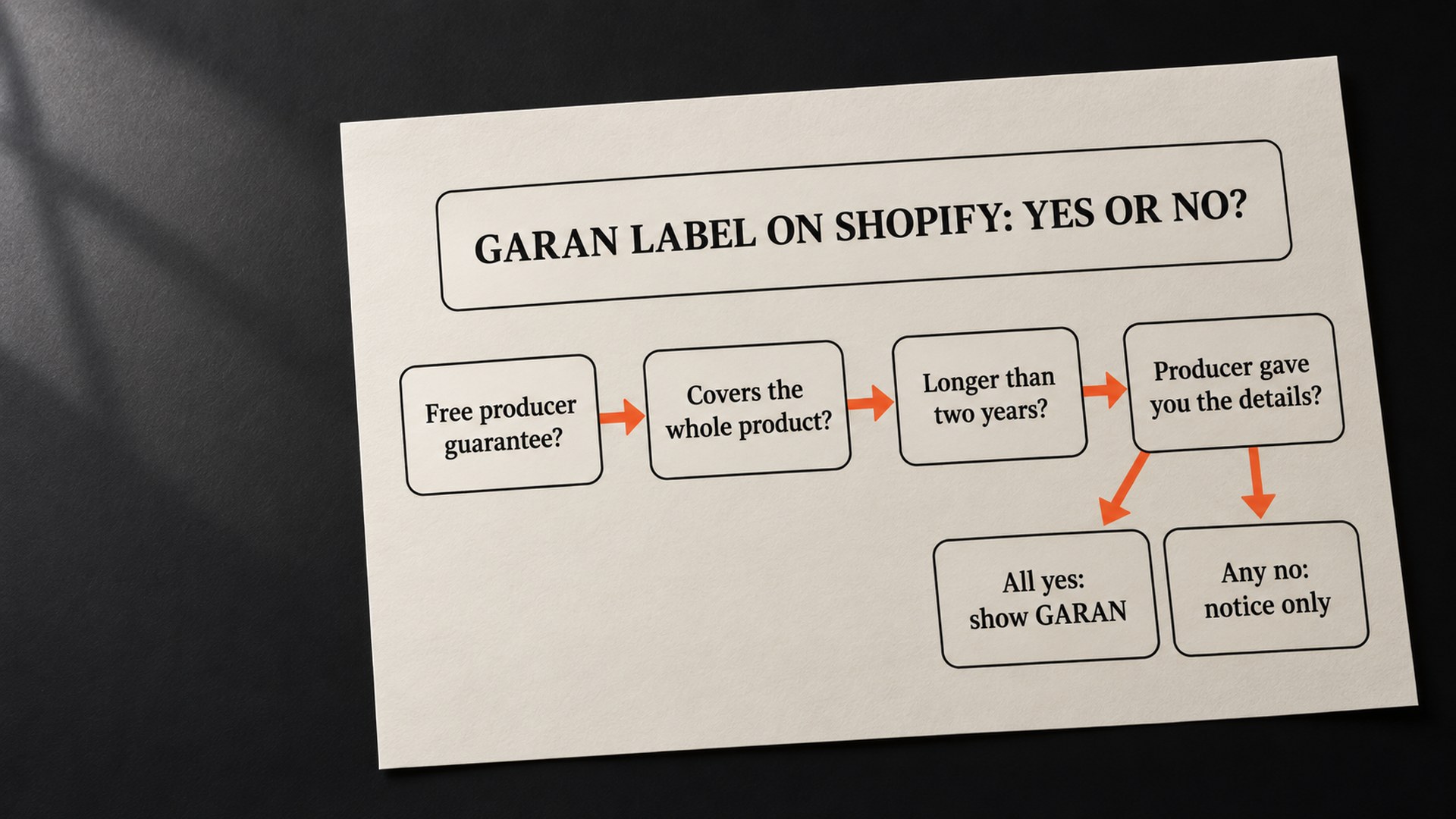
Two practical points follow. First, if you sell your own brand and you give a free guarantee of more than two years, you may be both the producer and the seller. That is my reading, and it is the one question in this guide where I would ask a lawyer before publishing a label. Second, never add a GARAN label to a product that does not meet the conditions. The label tells shoppers that a specific guarantee exists, so it should exist.
The Commission also offers a GARAN label file for e-commerce on the page above. Unlike the notice, the label has fields the producer fills in: the brand, the model and the length of the guarantee in years. The rest of the label cannot be edited.
How to keep the EU guarantee notice from slipping
The notice does not break by itself. It disappears when something else changes, and those are the moments to recheck:
- Theme updates: a new theme version or a switched theme can drop a custom block without telling you. Recheck the product template afterwards.
- New markets: adding an EU country to your sales settings adds a language to cover and a page version to check, along with the duty settings I covered in Shopify Managed Markets and duties.
- App changes: if an app inserts the notice, an uninstall or an outage can take it with it. Look for a version that renders inside your theme.
- Email templates: an edit to the order confirmation can remove the notice from the email.
A monthly look at one product page and one test order is a sensible habit for all four. Two other EU rules that Amazon sellers meet have their own guides. I wrote about the first in the Amazon ECGT notice and eco-friendly claims, which comes from the same Directive (EU) 2024/825, and about the second in GPSR and the EU Responsible Person.
Have your Shopify product pages checked before Black Friday
The check is dull. If you run a Shopify store beside your Amazon business and you ship into the EU, we can review your product page, cart and confirmation email against the five checks above and tell you what is missing, before Black Friday traffic arrives on 27 November 2026. That sits inside our Shopify store design service, and it is a review of what is on your pages, not a guarantee about how any regulator or shopper will react. Get in touch and we will look at it together. If you are also expanding your Amazon catalogue into the EU, our guide to expanding into the UK, EU and Canada covers the Amazon side.
Common questions about the EU guarantee notice on Shopify
Is the EU guarantee notice mandatory for a Shopify store
The regulation describes the harmonised notice as a mandatory notice at the point of sale, and it applies from 27 September 2026. The Commission's practical guidelines say sellers are required to display it in a prominent manner. Source: Commission Implementing Regulation (EU) 2025/1960, EU primary source, published 2 October 2025.
Can I write my own version of the EU guarantee notice
No. Annex I of the regulation says none of the elements of the harmonised notice can be edited, and the Commission's guidelines tell sellers to use the official files provided. A sentence of your own that points to the guarantee can lead to the notice, but it does not replace it. Source: Practical guidelines on the EU notice and label, European Commission.
Where should the notice go on my product page
The Commission leaves the placement to the seller, as long as it is prominent. Its examples for online shops are a sentence such as "Your legal guarantee rights" on the product catalogue page, in the site header or at the check-out page, which opens the full notice on the first click or roll-over. We put it beside the price and buy buttons first, which is our own preference rather than the Commission's rule.
Does a US or UK Shopify store need the EU guarantee notice
Our reading is that it depends on who you sell to. A store that sells goods to consumers in the EU is, in our reading, in scope wherever the company is based, and a store that sells only to UK consumers is outside an EU rule. Edge cases, such as a store that sells to both consumers and businesses, are a question for a lawyer.
Does every product need the GARAN label
No. The regulation describes the label as a voluntary commercial guarantee of durability that producers offer. A seller shows it when a producer offers a free guarantee that covers the whole product, lasts more than two years and has been passed on to the seller. Source: Commission Implementing Regulation (EU) 2025/1960, recital 8.
Should the notice be in my order confirmation email
The Commission's guidelines say the harmonised notice should also be included in the confirmation email. That is a should rather than a must, and adding it is usually a small template edit, so we recommend it. Source: Practical guidelines on the EU notice and label, European Commission.
Sources
- Commission Implementing Regulation (EU) 2025/1960, EUR-Lexeur-lex.europa.eu
- Practical guidelines on the EU notice and label, European Commission (2026)commission.europa.eu
- Practical guidelines and high resolution vector files, European Commission (19 March 2026)commission.europa.eu
Founder, AVA INC.
Shilpi Dudani is the founder of AVA INC. Her team manages Seller Central accounts, fixes catalog problems and optimizes listings for Amazon sellers.
Not sure whether this is your problem?
We will look at your account and tell you what is actually wrong before you spend anything.
Get your free, no-obligation audit