Buy with Prime on Shopify or MCF Prime delivery: which one fits your store
Two ways to show Prime on Shopify since 24 September 2026. What Buy with Prime and MCF Prime delivery need, what they cost, and what to check before peak.

- 11 min read
- Marketplace Expansion
Fact-checked against Amazon's and Shopify's own pages on 17 Nov 2026
On this page
The short answer
- Two products, one app: Buy with Prime adds Amazon Pay and the shopper's Amazon account to your Shopify checkout, with returns automated by Amazon; MCF Prime delivery is a shipping option at your own Shopify checkout, launched on 24 September 2026 (Amazon's Prime delivery for merchant websites announcement).
- Who can use Buy with Prime: only merchants with a US-based entity, with Shopify Payments and Amazon Pay set up as a wallet.
- Who can use MCF Prime delivery: MCF merchants selling in the US, on orders from their own website, for stock that is available in Amazon's fulfillment centers. No Buy with Prime account is needed.
- What it costs: Amazon says Prime delivery has no additional cost over MCF Standard fulfillment fees, so every Prime order is an MCF order you pay for.
- What to check first: which of the two your store actually runs, which SKUs have Prime switched on, and whether your Amazon listing can spare the units.
On 3 November 2026 a store owner in the Netherlands left a three-star review of Amazon's Shopify app, the one listed as Amazon MCF and Buy with Prime. Their complaint, in the Shopify App Store reviews for Amazon MCF and Buy with Prime, was that Buy with Prime only works if you have a business in the USA.
For Buy with Prime, they are right. What the review does not mention is that since 24 September 2026 the same app holds a second way to show Prime on a Shopify store, with different rules. Amazon calls it Prime delivery, it runs through Multichannel Fulfillment (MCF), and it does not need a Buy with Prime account at all.
So "Buy with Prime on Shopify" now means two different things, and an FBA seller with a Shopify store can pick either, both, or neither. One brings Amazon Pay and the shopper's Amazon account into your checkout and lets Amazon automate returns. The other is a shipping option that leaves your checkout alone. With Black Friday close, the choice is worth making on purpose, not by whichever button the app showed you first.
Why there are two ways to show Prime on Shopify
Buy with Prime is the older of the two. You add Amazon Pay as a wallet, which Amazon says helps verify the shopper's Prime status and lets them check out with the address and card stored in their Amazon account. Returns inside the free return window are automated, and Amazon's help page says "There are no return fees for Buy with Prime orders."
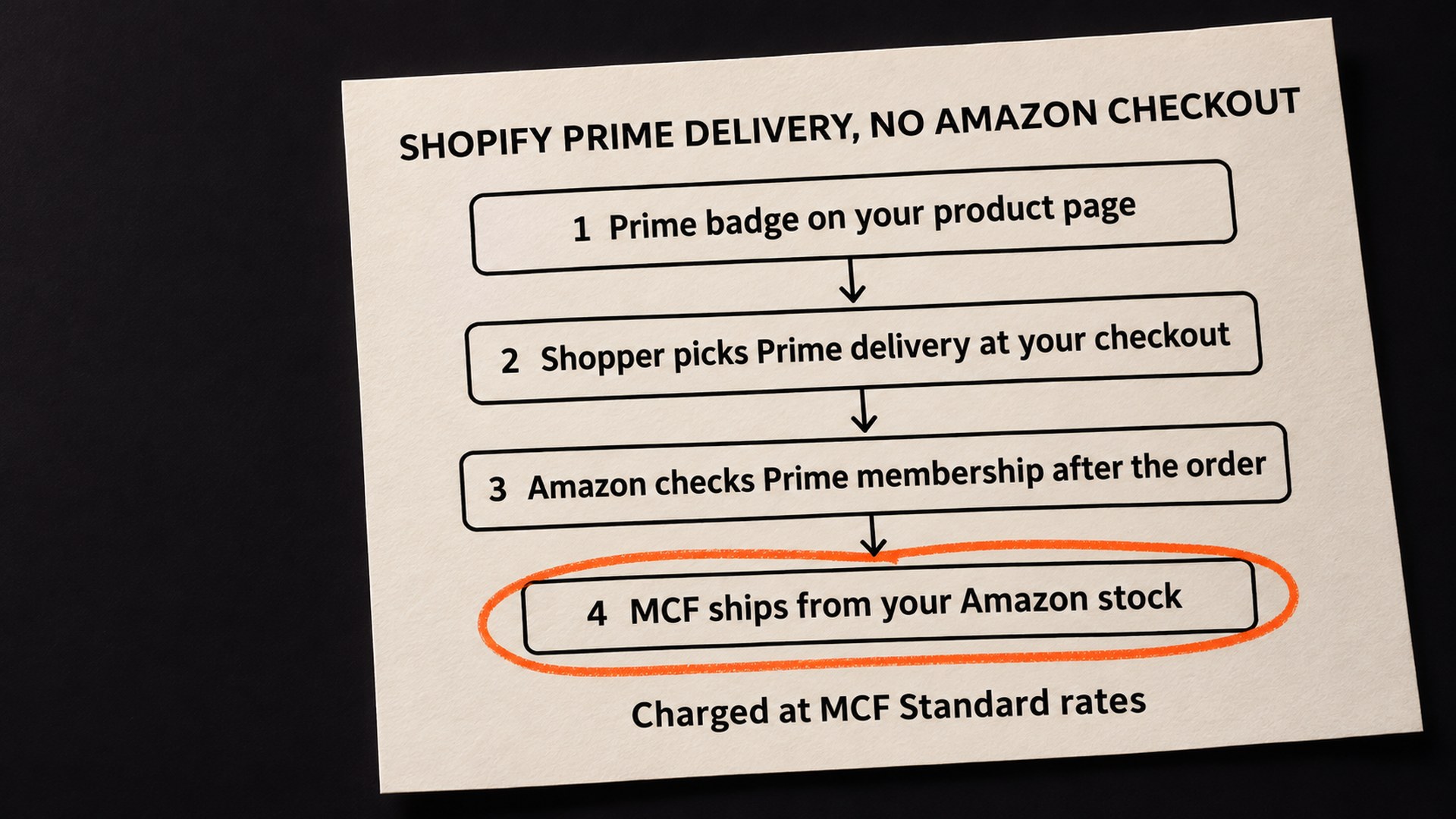
Prime delivery is newer and smaller. Amazon's Multichannel Fulfillment app for Shopify help page describes it as "a shipping option within MCF". Shoppers see the Prime badge on products with available stock in Amazon's fulfillment network and choose Prime delivery at checkout "without needing to login to Amazon." Amazon checks their Prime membership after the order is placed.
Amazon's announcement says merchants do not need to change their payment processing, order management or store policies, and that they keep their existing returns and customer service experiences. Order confirmation and tracking come from you, not from Amazon.
The table sets the two side by side, using only Amazon's own pages.
| Buy with Prime | MCF Prime delivery | |
|---|---|---|
| What it is | Prime with Amazon Pay at your checkout | A shipping option at your normal checkout |
| Shopper's Amazon account | Used at checkout through Amazon Pay | No Amazon login needed |
| Business entity | US-based entity only | Amazon's pages name MCF merchants selling in the US and do not mention an entity rule |
| Shopify Payments and Amazon Pay | Both required | Not required for an MCF only setup |
| Buy with Prime account | Yes, a Buy with Prime account | Not required |
| Returns | Automated, no return fees | Yours, as now |
| Customer service | The two Amazon pages disagree (see below) | Yours, as now |
| Cost Amazon states | Buy with Prime's own fees | No additional cost over MCF Standard fees |
| Where it works | Your website, US shipping addresses | Your website only, not TikTok or Walmart |
The customer service row needs care, because Amazon's announcement describes Buy with Prime as including shopper customer service while the help page answers "No" to whether Amazon's customer service handles Buy with Prime order issues, and says "You provide customer support for your customers directly, including support related to Buy with Prime orders." Until Amazon's two pages agree, I would plan on answering your own customers either way.
Which Prime option does my Shopify store qualify for?
The review that opened this guide shows an easy trap to fall into. A seller outside the US sees "Buy with Prime" in the app's name, reads the US entity rule, and decides Prime is closed to them. Amazon's help page is plain on the Buy with Prime side: it "is currently only available to merchants with a United States-based entity and for orders with shipping addresses in the contiguous United States, Alaska, Hawaii, and Puerto Rico."
MCF Prime delivery is described differently. Amazon's announcement names "New and existing Multichannel Fulfillment merchants selling in the U.S." The help page says Prime delivery "is a feature of MCF and doesn't require a Buy with Prime account or access to the Buy with Prime console." Neither page says whether a merchant without a US entity can use it, so I would not assume either way. If that is you, the honest step is to open the app, see whether the Prime option is offered on your MCF SKUs, and ask Amazon's merchant support in writing if it is not.
Three other conditions apply to Prime delivery whatever your entity:
- Website orders only: Amazon says Prime delivery is not currently available on other channels MCF supports, such as TikTok or Walmart.
- Stock already in Amazon's network: the app syncs only inventory available for immediate fulfillment, and "Inbound inventory isn't taken into consideration."
- One-time purchases: the app does not support Subscribe and Save, so a subscription product needs its own plan.
What to check first, before Black Friday traffic
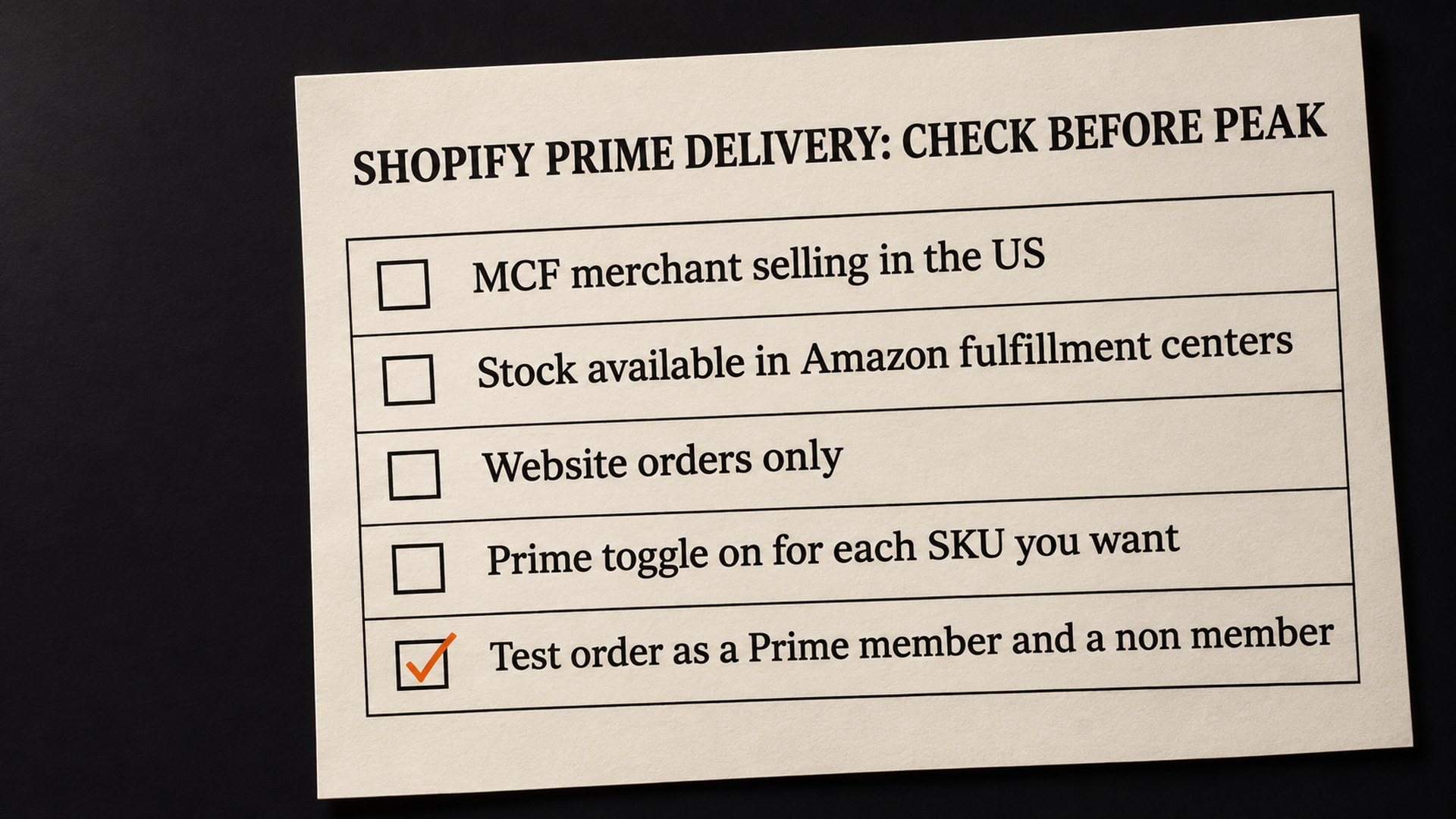
Before choosing anything, I would want to know what the store is running today. Three checks answer most of it.
- Which app and which setup. If your store still runs Buy with Prime through older checkout snippets, Amazon's guide to migrating to the Multichannel Fulfillment app for Shopify says to deactivate the old Buy with Prime checkout once the app is set up, "to avoid showing two Buy with Prime buttons on your site." Two Prime buttons on one product page confuses shoppers, and it is easy to miss on desktop if you only ever check your store on a phone.
- Which SKUs have Prime on. Each SKU with MCF as its fulfillment service has a Prime On/Off toggle in the app's product catalog. A store can end up with Prime on the hero product and off its variants, or the other way round.
- What a Prime order costs you. Prime delivery adds no fee over MCF Standard, but it is still an MCF order, paid by you. Amazon's help page also says shoppers who are not Prime members get "complimentary Prime delivery once", then MCF Standard on later orders. Your MCF fees per order sit in your Seller Central payment statements, which is where I would look before deciding whether free Prime shipping fits your margins.
If you use Shop Pay, there is a fourth. Amazon says Prime with Shop Pay works automatically when you use the app, offer Shop Pay as an accelerated checkout and have split shipping turned on, and only for shoppers who have linked their Amazon and Shop accounts. You cannot opt out of it under those settings, so it is better to know it is there than to discover it in your order list.
How to choose and switch it on
The choice comes down to what you want Amazon to own on your store.
MCF Prime delivery tends to suit a seller who already ships Shopify orders through MCF, wants the Prime badge, and wants to keep their own checkout, payment provider, customer list and returns process. Amazon's announcement claims it is "more than 70% faster on average" to add than standalone Buy with Prime. That is Amazon's figure, not one I have measured.
Buy with Prime tends to suit a US-entity brand that already uses Shopify Payments and would rather have Amazon run returns. The trade is the shopper's Amazon account inside your checkout, and Amazon Pay set up as a wallet in Shopify Payments.
Whichever you pick, the order of work matters more than the speed:
- Confirm the stock. A Prime badge only shows where there is available inventory in Amazon's network, so the SKUs you want badged need to be checked in, not in transit.
- Use the Prime toggle so that only a small set of SKUs carries Prime at first, ideally the ones with the healthiest stock. Check every SKU's setting rather than assuming what it starts on.
- Place a test order as a Prime member and another as a non-member, on a phone and a desktop, and check the badge, the shipping option and the tracking email that reaches the customer.
- Widen it to the rest of the catalog once the first orders ship cleanly.
One more cost belongs in the same margin check. Amazon says MCF chooses the carrier, and if you block Amazon Logistics from shipping your US orders, that carries an additional surcharge.
On fees more broadly, Amazon announced MCF Preferred Pricing alongside Prime delivery, and says it gives FBA sellers savings of 15% to 25% on fulfillment fees for the first six months, through a discount on MCF fulfillment fees plus FBA credits on each unit shipped, with deeper discounts the more you ship and one-click enrolment in Seller Central. The terms that apply to your account are the ones Seller Central shows you, so I would read them there rather than from a summary. Our guide to the 2026 FBA fee changes covers the wider fee picture.
How to stop Prime on Shopify draining your Amazon stock
MCF and FBA draw from the same pool of inventory. That is the point of the service, and it is also the risk in peak season. Amazon says that among early adopters, more than 40% of eligible orders on average shipped with Prime delivery. That is Amazon's own number, not a forecast for your store, but if your Shopify orders do pick up, they come out of the same units your Amazon listing is selling.
- Keep a buffer for Amazon: decide how many units your Amazon listing needs through the holidays before you promise Prime on Shopify. Running out on Amazon has its own recovery cost, which our guide to rank recovery after a stockout explains.
- Watch receiving dates: inbound stock does not count for the badge, so late shipments mean late badges. Our guide to the FBA Black Friday arrival deadline covers why delivered is not the same as ready.
- Review after 30 days: compare conversion on Prime-badged products with the rest, the return rate, and the MCF cost per order. Then decide what stays on.
- Keep the channels connected properly: our guide to multichannel selling tools covers how the pieces link up across Amazon, Shopify and Walmart.
Get your Shopify Prime setup checked before Black Friday
Most problems with Prime on Shopify are settings problems: the wrong product switched on, an old checkout snippet still live, a SKU mapped to stock that is still inbound, or a fee nobody priced. They are quick to find before peak traffic and slow to unpick after it.
Our marketplace expansion service covers setting up selling across channels, Shopify included. It includes multi-channel setup for Shopify, which is where the questions in this guide sit: which Prime option to use, and how your Amazon stock is shared across channels. If you would rather start smaller, our free audit reviews one Amazon listing by email, at no cost.
Common questions about Buy with Prime and Prime delivery on Shopify
Do I need a US business to offer Prime on my Shopify store?
For Buy with Prime, yes. Amazon's help page says it is only available to merchants with a US-based entity, for US shipping addresses. MCF Prime delivery is described as a feature for MCF merchants selling in the US that does not need a Buy with Prime account, and Amazon's pages do not say whether a non-US entity can use it, so check the app and ask Amazon's merchant support if the option is missing.
Does MCF Prime delivery cost extra?
Amazon says Prime delivery has no additional cost over MCF Standard fulfillment fees. Each Prime order is still an MCF order that you pay for, and shoppers who are not Prime members get complimentary Prime delivery once, then MCF Standard on later orders.
Do my customers need to sign in to Amazon to use Prime delivery?
No. Amazon's help page says shoppers choose Prime delivery at your checkout without needing to log in to Amazon, and Amazon verifies their Prime membership after the order is placed. Buy with Prime works differently: it uses the shopper's Amazon account at checkout through Amazon Pay.
Do I need Shopify Payments for Prime on Shopify?
Only for Buy with Prime. Amazon's help page lists Shopify Payments and Amazon Pay as a wallet as requirements for Buy with Prime, and notes that neither step is necessary for an MCF only integration.
Who handles returns for Prime orders on my Shopify store?
With MCF Prime delivery, Amazon says you keep your existing returns and customer service. With Buy with Prime, returns and refunds inside the free return window are automated and Amazon says there are no return fees for Buy with Prime orders.
Can I offer Prime delivery on TikTok Shop or Walmart orders?
Not at the moment. Amazon's help page says Prime delivery is available only for orders from your website and is not currently available on other channels MCF supports, such as TikTok or Walmart.
Sources
- Prime delivery on merchant websites and MCF Preferred Pricing, About Amazon (24 September 2026)aboutamazon.com
- Reviews of Amazon MCF and Buy with Prime, Shopify App Store (third party)apps.shopify.com
- Multichannel Fulfillment app for Shopify (Amazon MCF and Buy with Prime), Buy with Prime knowledge centerbuywithprime.amazon.com
- Migrate to the Multichannel Fulfillment app for Shopify, Buy with Prime knowledge centerbuywithprime.amazon.com
Founder, AVA INC.
Shilpi Dudani is the founder of AVA INC. Her team manages Seller Central accounts, fixes catalog problems and optimizes listings for Amazon sellers.
Not sure whether this is your problem?
We will look at your account and tell you what is actually wrong before you spend anything.
Get your free, no-obligation audit