Walmart WFS Inventory Transfer Service: who gets it and what it costs
Walmart's WFS Inventory Transfer Service sends sortable stock to one transfer station. See who can use it, the per-unit fee table and how to ask.

- 13 min read
- Marketplace Expansion
Fact-checked against Amazon's and Walmart's own pages on 4 Nov 2026
On this page
The short answer
- What it does: the Walmart WFS Inventory Transfer Service lets you send all your sortable inventory to one transfer station, and Walmart distributes it to fulfillment centers nationwide for a fee.
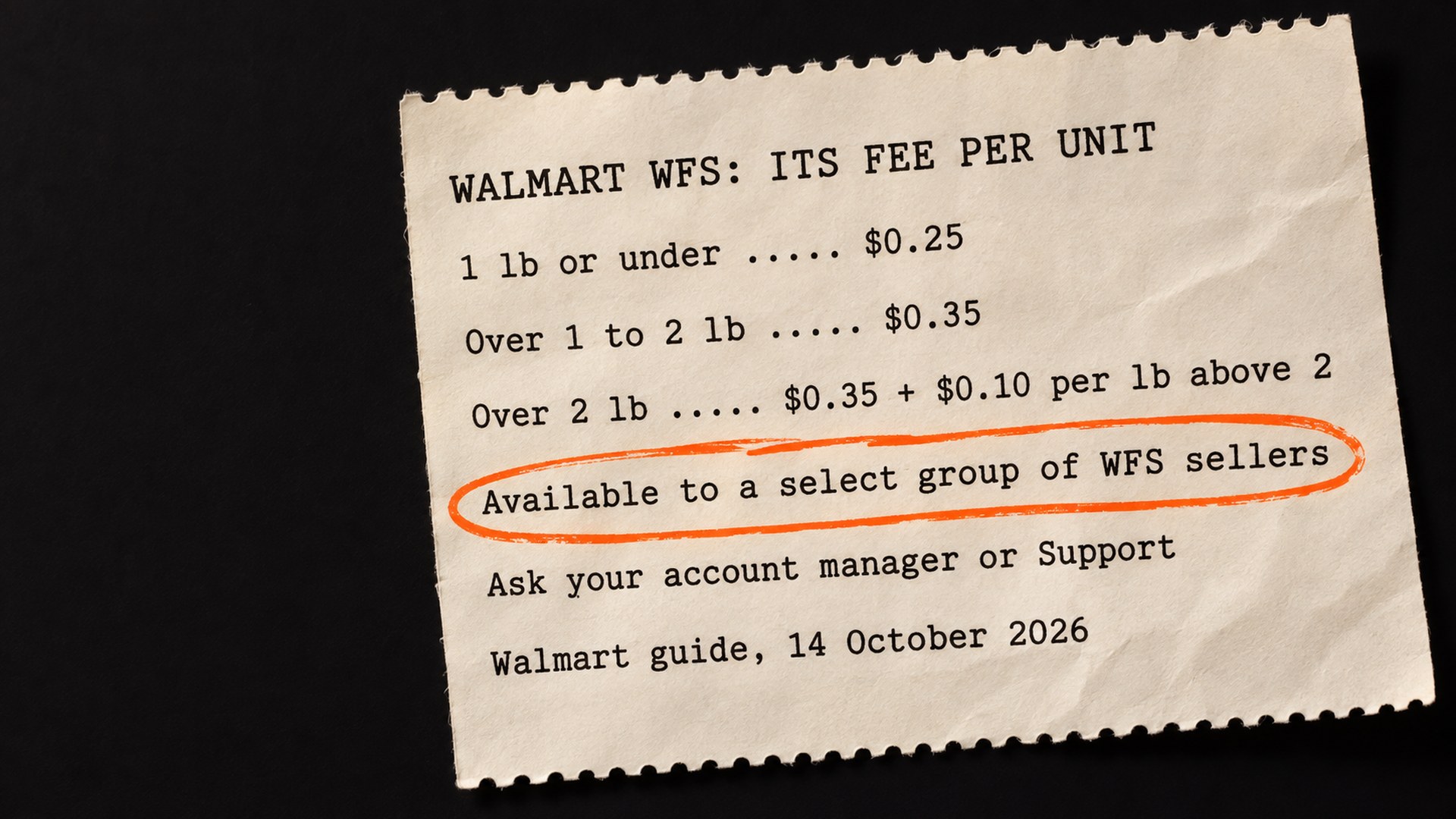
- Who can use it: Walmart’s guide says a select group of WFS sellers, based on inventory type, and tells you to contact your account manager or Support to ask.
- What it costs: $0.25 a unit at 1 lb or under, $0.35 over 1 to 2 lb, and $0.35 plus $0.10 for each lb above 2, with the shipping weight rounded up to the nearest pound.
- What you give up by skipping it: Walmart says you are then required to ship to all the fulfillment centers assigned to you.
- What to plan for: Walmart says to wait at least 10 days from delivery for receiving to finish before you dispute anything.
The Walmart WFS Inventory Transfer Service has a fee table that looks cheap, and then Walmart’s guide to it, updated on 14 October 2026, adds this: “Currently, ITS is available only to a select group of WFS sellers based on inventory type.” So you can read the whole table and still not be able to switch the service on.
ITS lets you send your sortable stock to one building and have Walmart spread it across the country. The alternative is to split the stock and ship to every fulfillment center Walmart assigns you. This guide covers who ITS is for, what it costs per unit, how to ask for it, and what to watch once stock is inside. The Walmart facts here come from Walmart’s own guides, read on 4 November 2026. Where I am reasoning or doing arithmetic, I say so.
What does the Walmart WFS Inventory Transfer Service do?
When you create a WFS shipping plan, Walmart shows you two options. You can use ITS and send everything to one transfer station, or you can distribute the inventory yourself to the fulfillment centers assigned to you. Walmart notes that the second route “may mean splitting your inventory and packing multiple shipments.”
With ITS, Walmart takes the one shipment and splits it for you. It chooses the final destinations based on each item’s level on hand, on order and geography-based demand. Walmart lists four benefits: inventory available across the nation, better next-day and weekend delivery, savings on inbound shipping costs from sending one shipment, and simpler prep and tracking. Those are Walmart’s claims, and its guide does not give a sales figure for any of them.
Who can use Inventory Transfer Service, and what counts as sortable?
There are two gates. The first is the one in the quotation above: Walmart limits ITS to a select group of WFS sellers based on inventory type, and the way in is to contact your account manager or Support. In the part of the guide I could read, Walmart does not say how the group is chosen beyond “inventory type”, so I cannot tell you what makes a seller qualify.
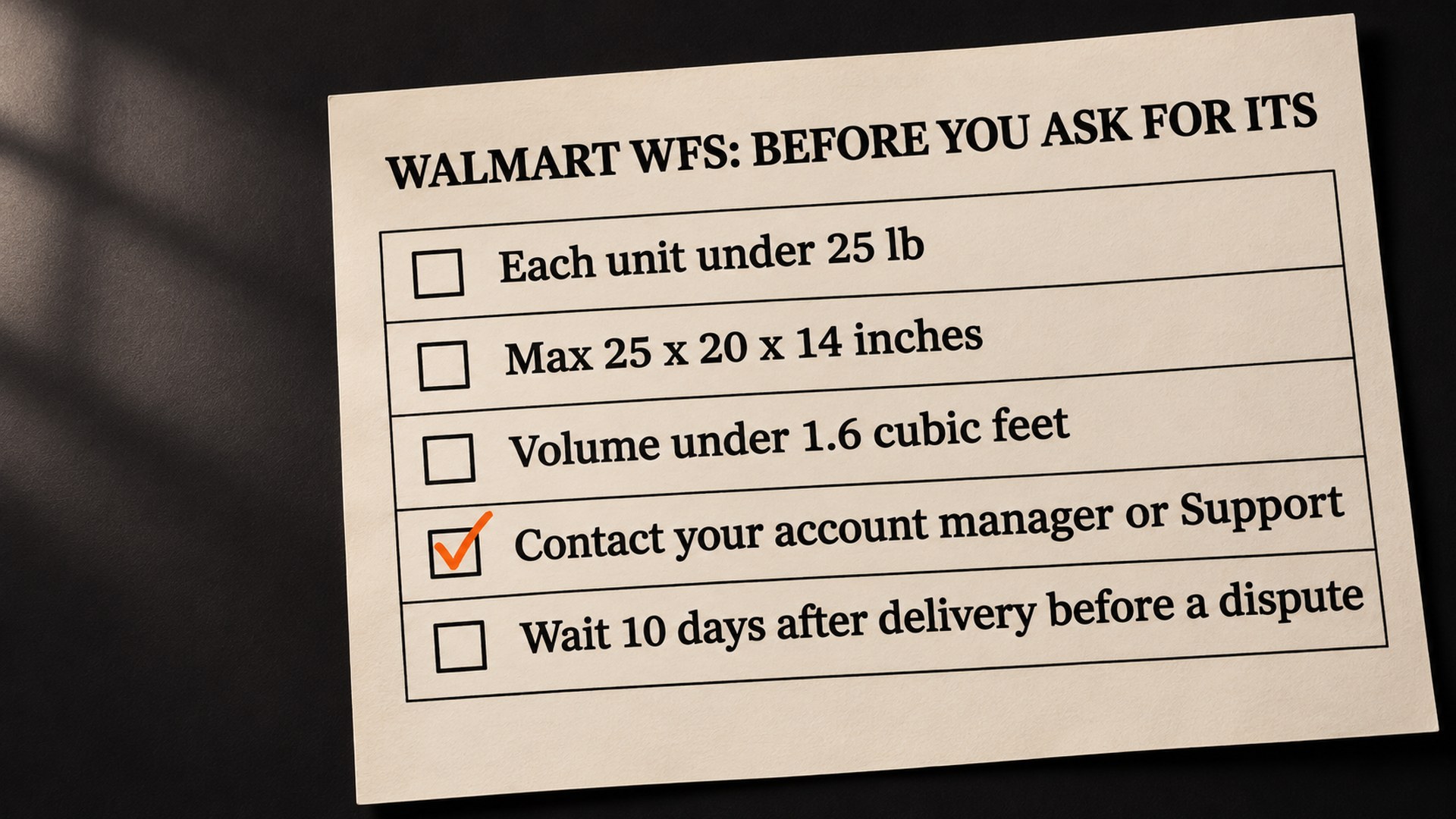
The second gate is the item, for domestic shipments. Walmart defines a sortable item as one that is:
- Weight: less than 25 lb (11.3 kg).
- Size: maximum dimensions of 25 x 20 x 14 inches (63.5 x 58.4 x 35.5 cm).
- Volume: less than 1.6 cubic feet, which you work out as length x width x height in inches, divided by 1,728.
Walmart also warns that some shipping plans may not offer ITS because the items are not sortable or eligible. If you open a plan and the ITS option is missing, check sortability first, though “eligible” may also mean your account.
How much does the Walmart ITS fee cost per unit?
The guide’s fee table has the real numbers. Walmart charges ITS per unit, by shipping weight, and these are its per-unit fees:
| Shipping weight (rounded up to the nearest lb) | ITS fee per unit |
|---|---|
| 1 lb or under | $0.25 |
| Over 1 to 2 lb | $0.35 |
| Over 2 lb | $0.35 plus $0.10 for each lb above 2 |
The shipping weight is not always the weight on your scale. For a unit under 1 lb, Walmart uses the unit weight, rounded up. For a unit at or over 1 lb, it uses the greater of the unit weight or the dimensional weight, rounded up. Dimensional weight is length x width x height in inches, divided by 139.
Two example products show how it works out. These are my examples, not Walmart’s, worked from the table above:
- A 1.2 lb unit in a snug 6 x 5 x 4 inch box: the dimensional weight is under 1 lb, so the unit weight wins and rounds up to 2 lb, so $0.35 a unit. For 500 units, $175.00.
- A 1.2 lb unit in a roomy 12 x 10 x 8 inch box: the box is 960 cubic inches, which divided by 139 is about 6.9, so the dimensional weight wins and rounds up to 7 lb. That is $0.35 plus five extra pounds at $0.10, so $0.85 a unit. For 500 units, $425.00.
The last example is the reason I would measure the packed unit before saying yes. The same product in the snug box costs $0.35, so the roomy box costs about 2.4 times as much. When you create a plan, Walmart shows an estimated total cost, and that estimate is the number to trust over my arithmetic.
One scope note: Walmart Cross Border: Imports has its own rules. As of 14 October 2026, Walmart says sortable Imports shipments by ocean use ITS, ITS also applies to non-sortable Imports shipments sent to a transfer station (free for a limited time), and the charge is capped per shipment, for example $2,200 for a 20 foot dry container. If you ship through Imports, read that section of the guide, because the table above is not the whole story for you.
What should you check before asking for ITS?
I would do the homework before opening a ticket, so your request has numbers behind it. In this order:
- Are your units sortable? Check weight, size and volume against Walmart’s definition above, using the packed unit and not the bare product.
- What shipping weight does each SKU land on? Work out the greater of unit and dimensional weight, round up, and read off the fee.
- What does splitting cost you today? Walmart says without ITS you must ship to all your assigned fulfillment centers. Your own freight quote for that, against the ITS fee on the same units, is the comparison that matters. Walmart does not publish that comparison for you.
- Are the listings ready to be received? Walmart’s receiving guide says to make sure items are published and Walmart-fulfilled. If a listing is unpublished, our guide to Walmart listings that get unpublished is the place to start.
How do you ask Walmart for Inventory Transfer Service access?
Walmart’s instruction is short: contact your account manager or Support. The guide describes no self-serve switch.
What goes in the message is my suggestion, and Walmart has not asked for any of it. I would say plainly that you want ITS access for your WFS shipments, name the SKUs, and give the packed weight and dimensions so whoever reads it can see the items are sortable. In the part of the guide I could read, Walmart does not say how long a request takes or what it weighs, so a clear request is the one thing in your hands.
When you get an answer, test on a small shipment first. Walmart’s guide shows the shipping plan estimate before you commit, and a first shipment of a few SKUs should show you the real fee and the real receiving pace before you route the whole catalog through a single transfer station.
What can go wrong with ITS shipments, and how do you track them?
Walmart does not say that ITS changes the usual receiving problems, so I would assume they apply, with one more stop on the way. Walmart’s receiving guide (a general WFS guide, last updated 24 July 2026, not specific to ITS) says properly packed and labeled items are usually received within 2 business days, and lists some common reasons they are not: damage, incorrect prep, an unexpected item, an overage, and incorrect item setup. Walmart’s example of the last one is an item that does not match the GTIN in its system, or that has not been converted to Walmart-fulfilled.
That last cause deserves a second look, because a GTIN mismatch is a catalog problem and the warehouse cannot fix it by looking harder at the box. I cannot tell you that ITS makes mismatches more likely, because Walmart does not say so and I have no data on it. I can say the cheapest time to find one is before the cartons leave you.
To follow a shipment, Walmart gives you a path:
- Open the Shipping Plans page and find the shipment.
- Select Track for a side panel with where the shipment is and how many units are received.
- For more detail, select View shipping plan, then Track items.
The Track items table has three tabs. Shipment confirms what you sent. Transfer station compares units checked in against units checked out, with actions under an Issues column if something is wrong. Fulfillment centers shows where each unit landed and whether it was received. Imports shipments do not get this enhanced tracking for ITS.
On timing, Walmart is specific: associates inspect and put away each unit by hand, so wait at least 10 days from delivery for receiving to finish. If you believe inventory is missing, you can open a dispute after 10 days. The receiving guide says a dispute can be opened between 10 and 50 days from delivery, as confirmed by tracking. Separately, it says Walmart investigates a receiving issue within 7 business days. Put those two dates in your calendar when the shipment lands, because the 50 day end of the window is the one that is easy to forget.
The habit is the same as on Amazon: count what you sent, keep the tracking, and compare against what was received once the status says Completed. Our guide to FBA shipment reconciliation shows the Amazon version.
How does ITS compare with Amazon’s inbound placement fee?
If you sell on both marketplaces, the two networks offer similar choices. This section is about Amazon.com in the US, and the Amazon numbers come from Amazon’s FBA inbound placement service fee page.
On Amazon you pick from the inbound placement options your plan qualifies for. The minimal shipment splits option sends it to generally a single location, for a fee. The Amazon-optimized shipment splits option has you send to multiple locations yourself, with no inbound placement service fee, if each item ships in at least five identical cartons or pallets with the same quantity and item mix. For standard-size products from 15 January 2026, Amazon’s minimal split fees run from $0.14 to $0.32 for a small standard item at 8 oz or less, and $0.20 to $0.40 for a large standard item at 12 oz or less, and they vary by location. Amazon charges the fee 45 days after the shipment is received. Amazon-optimized has no placement fee, but Amazon says misrouted or abandoned shipments can incur defect charges, and the page lists separate exemptions, including for Extra-Large products and for Amazon Warehousing and Distribution.
At the light end, the two fees are in the same range. They are worked out differently, and they diverge by weight band, so compare your own SKUs. The domestic section of Walmart’s page does not say when ITS is charged. The shape is the useful part. Amazon’s free option is the one where you do the splitting and the carton work. Walmart’s one-shipment option is the one you pay for, and you have to be let in. Our Black Friday FBA arrival guide covers how the choice of split option affects Amazon’s arrival dates, and the multichannel selling tools guide compares fulfilling Walmart orders from WFS with fulfilling them through Amazon.
How do you keep ITS from costing more than it saves?
I would treat ITS as a decision you re-check, not a switch you flip once:
- Measure the packed unit: the dimensional weight rule means a box change can move a SKU into a more expensive fee band. Check the band whenever packaging changes.
- Compare the full cost each time: ITS fee plus freight to one building, against freight to every assigned fulfillment center.
Whether ITS moves your sales is something I cannot answer for you. Walmart’s guide describes better delivery coverage as a benefit, but it publishes no sales figure for it. If someone quotes you an uplift number, ask where it comes from.
Get your WFS inbound plan priced before the next shipment
Deciding between ITS and splitting your own freight comes down to your weights, your boxes, your assigned fulfillment centers and your catalog health. That is the work in our Walmart seller services: reading your shipping plan, working out the fee band for each SKU, checking the listings and GTINs before cartons go out, and telling you plainly which route costs less. We cannot promise that Walmart will grant access or how quickly it will answer, and we will not claim ITS will raise your sales.
If you would like a first look with no call, our free audit gives you a written review of one Amazon listing. For the shipping plan, contact us through the Walmart seller services page and we will go through it with you.
Common questions about the Walmart WFS Inventory Transfer Service
What is the Walmart WFS Inventory Transfer Service?
It lets you send all your sortable inventory to one building, called a transfer station, and have Walmart distribute it to fulfillment centers across the country for a fee. Walmart's ITS guide says Walmart picks the final destinations based on each item's level on hand, on order and geography-based demand.
Who can use Walmart ITS?
As of its 14 October 2026 update (read on 4 November 2026), Walmart's ITS guide says ITS is available only to a select group of WFS sellers based on inventory type. It says to contact your account manager or Support to get access. For domestic shipments, your items also need to be sortable, which Walmart defines as under 25 lb, within 25 x 20 x 14 inches and under 1.6 cubic feet. Walmart Cross Border: Imports works differently, and the guide says ITS also applies to non-sortable Imports shipments sent to a transfer station.
How much does the Walmart ITS fee cost?
Walmart charges $0.25 a unit at a shipping weight of 1 lb or under, $0.35 over 1 to 2 lb, and $0.35 plus $0.10 for each lb above 2. The shipping weight is rounded up to the nearest pound, and for units of 1 lb or more Walmart uses the greater of unit weight or dimensional weight (length x width x height in inches, divided by 139). Walmart Cross Border: Imports shipments have a per-shipment cap, set out in Walmart's ITS guide.
Do I have to use ITS for my WFS shipments?
Walmart's ITS guide presents ITS as one of two options when you create a shipping plan, for domestic shipments. Walmart Cross Border: Imports works differently, because the guide says sortable ocean shipments will use ITS. The other is to distribute the inventory yourself, and Walmart says you are then required to ship to all the fulfillment centers assigned to you. Some plans may not offer ITS at all if the items are not sortable or eligible.
How soon can ITS stock sell?
Walmart says some of your inventory may be available to sell within 4 business days of arriving at the transfer station. It also says associates inspect and put away each unit by hand, so receiving can take time. Treat the 4 days as a possibility for some units and not a promise for the whole shipment.
When can I dispute a missing ITS shipment?
Walmart's ITS guide says to wait at least 10 days from delivery for receiving to finish, and that you can open a dispute after 10 days if you believe inventory is missing. Walmart's receiving issues guide says a dispute can be opened between 10 and 50 days from delivery, as confirmed by tracking information. That guide covers WFS receiving in general, not ITS in particular.
Sources
- WFS Inventory Transfer Service: Overview, Walmart Marketplace Learn (updated 14 October 2026)marketplacelearn.walmart.com
- Troubleshoot WFS shipments with receiving issues, Walmart Marketplace Learn (updated 24 July 2026)marketplacelearn.walmart.com
- FBA inbound placement service fee, Seller Central help (US)sellercentral.amazon.com
Founder, AVA INC.
Shilpi Dudani is the founder of AVA INC. Her team manages Seller Central accounts, fixes catalog problems and optimizes listings for Amazon sellers.
Not sure whether this is your problem?
We will look at your account and tell you what is actually wrong before you spend anything.
Get your free, no-obligation audit